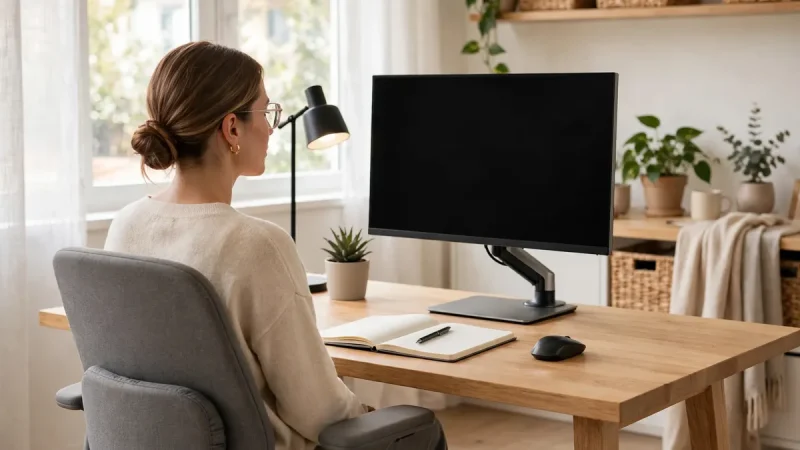

How to Improve Posture While Sitting at a Desk: A Beginner Guide That Actually Helps
Your shoulders creep up by midday. Your neck feels tight by lunch. Then your lower back starts to ache before the day ends.
Sound familiar? If so, you are not lazy or broken. In fact, your desk setup may quietly push your body into awkward positions for hours.
This guide shows you how to improve posture while sitting at a desk in simple, practical steps. First, you will fix your setup. Then you will learn how to sit, move, and reset during the day.
Also, you do not need expensive gear to start. A few books, a rolled towel, and small daily habits can help a lot. So take one change at a time, and notice what feels easier.
Start here with a simple desk ergonomics checklist
Start with your workspace, not with willpower. A good setup makes good posture much easier to hold. However, a poor setup fights you all day, even when you try hard.
Use this desk ergonomics checklist before you change anything else. Walk through each item slowly. Then fix the easiest problem first.
| Check | What good looks like | Quick fix |
|---|---|---|
| Chair height | Your feet rest flat and your knees sit near hip height. | Raise the chair or add a firm footrest. |
| Screen height | The top of the screen sits near eye level. | Raise the screen on books or a stand. |
| Screen distance | You can read without leaning forward. | Move the screen closer or enlarge the text. |
| Keyboard position | Your elbows stay relaxed and close to your body. | Bring the keyboard nearer to you. |
| Back support | Your lower back touches the chair back. | Add a small cushion or rolled towel. |
| Desk items | You reach daily items without twisting or stretching. | Move daily items within easy reach. |
Clearly, small details add up fast. For example, a screen that sits too low pulls your head forward all morning. A chair that sits too high leaves your feet dangling and your back unsupported.
Still, do not chase a perfect setup in one go. Change one item, then sit and work for twenty minutes. As a result, you will learn which change actually helps you.
What should you check first?
Check your screen and chair first, because they shape everything else. Your screen height guides your head position. Your chair height guides your hips, knees, and feet.
Then check your keyboard and mouse. If you reach forward for them, your shoulders will follow. Also, bring your phone and notebook closer, so you stop twisting for them.
Learn correct sitting posture at desk level, step by step
Now sit down and build your position from the floor up. This order matters, because each part supports the next one. So start with your feet, and work upward slowly.
Good correct sitting posture at desk level feels balanced, not rigid. You should feel supported, tall, and still able to breathe easily. If a position feels forced, then adjust it slightly.
- Sit back in your chair, so your hips touch the backrest.
- Place both feet flat on the floor, about hip width apart.
- Let your knees bend comfortably, roughly level with your hips.
- Sit tall through your spine, without arching your back hard.
- Rest your back against the chair, especially at your lower back.
- Drop your shoulders down, away from your ears.
- Keep your elbows close to your sides and bent comfortably.
- Level your head, so your ears sit above your shoulders.
- Relax your jaw, and look straight ahead at your screen.
Try this now. Sit back, plant your feet, and drop your shoulders. Then take three slow breaths, and notice your chest open up.
However, do not freeze in this position all day. Even a great position grows tiring when you hold it too long. So treat this shape as your home base, and return to it often.
Why does the feet flat on floor sitting posture matter so much?
The feet flat on floor sitting posture gives your whole body a stable base. Your feet share your weight and stop your legs from pulling on your back. As a result, your hips and spine settle more easily.
If your feet dangle, then add support under them. A sturdy box, a stack of books, or a footrest all work well. Also, avoid crossing your legs for long periods, because that twists your pelvis.
How does the 90 degree rule help you?
Many guides use 90 degree elbows knees hips sitting as a simple starting picture. Your elbows bend near a right angle. Your knees and hips sit near that same comfortable angle.
Think of that picture as a guide, not a strict law. Some people feel better with slightly more open angles. In fact, comfort and support matter more than exact numbers.
So use the rule to check yourself quickly. Are your elbows jammed or stretched out? Are your knees much higher than your hips? Then adjust your chair or desk height a little.
Set your chair up so it supports you properly
Your chair does much of the posture work for you. A well set chair holds your back and lets your muscles relax. However, a poorly set chair makes you slouch or perch.
First, adjust the height, so your feet rest flat. Then sit fully back, rather than perching on the front edge. Also, leave a small gap behind your knees, about two fingers wide.
Do you need extra support for your lower back?
Many chairs leave a gap behind your lower back. That gap invites slouching, especially when you tire. So fill the gap with gentle support.
A lumbar support cushion for office chair use can work very well here. Place it where your back curves inward, just above your belt line. Then sit back and let the cushion meet your back.
Also, a rolled towel or small firm pillow works as a starter option. Try each option for a day or two. Clearly, the best support is the one you will actually use daily.
If support pushes you forward too much, then choose a thinner one. Your back should feel held, not shoved. As a result, you will sit taller with less effort.
Put your screen where your neck wants it
Your head follows your eyes all day long. So your screen position quietly decides your neck position. A low screen pulls your chin down and forward for hours.
Aim for screen at eye level posture throughout your workday. The top third of your screen should sit near your eye level. Then you can look slightly down at the centre without bending your neck.
What causes forward head posture from laptop use?
Laptops pack the screen and keyboard together in one low unit. So you either hunch over the screen or reach up to type. Over time, that pattern can build forward head posture from laptop work.
You may notice tight shoulders and a stiff neck by evening. You may also notice neck strain from desk job routines that never change. However, simple changes can ease that daily pattern a lot.
For example, raise the laptop and use a separate keyboard and mouse. Then your screen rises and your hands stay low and relaxed. That single split fixes two problems at once.
How can books help your laptop setup?
Raising laptop on books ergonomics is the cheapest fix in this whole guide. Stack two or three sturdy books under your laptop. Then check that the screen now sits near eye level.
Also, keep the stack stable and flat, so the laptop never wobbles. Then add an external keyboard and mouse at desk height. As a result, your neck lifts and your shoulders drop.
Use a standing desk without creating new aches
Standing all day is not a magic answer either. Your feet, knees, and back tire when you stand still for hours. So the real win comes from changing position often.
These standing desk posture tips keep standing comfortable and safe. Stand tall, with your weight even on both feet. Keep your screen at eye level and your elbows relaxed, just like sitting.
- Wear supportive, flat shoes, or stand on a soft mat.
- Keep your knees soft, never locked straight.
- Rest one foot on a low step now and then.
- Raise your desk, so you never hunch over it.
- Shift your weight gently from side to side.
The sit stand desk alternating positions approach works best for most people. Sit for a while, then stand for a while. For example, stand for a call, then sit for focused writing.
Also, build the change slowly over a week or two. Start with short standing spells, then lengthen them as you adapt. As a result, standing feels like relief, not another chore.
Move a little and often during your workday
Your body loves movement more than any perfect chair. Still, desk work locks you into one shape for hours. So planned movement breaks matter as much as your setup.
People often ask how often to take movement breaks at work each day. A gentle pattern helps many desk workers: move briefly every half hour or so. Then take a longer walk at lunch, if you can.
Also, link breaks to tasks you already do. Stand when a meeting ends. Walk while you take a call. Then refill your water glass, and stretch while you wait.
Movement also supports your wider health habits. For instance, pairing short walks with simple fitness and nutrition tips for busy workdays can lift your energy steadily. Clearly, small moves done often beat one huge effort done rarely.
What can a posture check every 15 minutes do for you?
A posture check every 15 minutes sounds small, yet it changes everything. Set a quiet timer or use a sticky note as your cue. Then run through three quick checks each time.
First, check your feet and sit back in your chair. Next, drop your shoulders and level your head. Then take one slow breath, and carry on with your work.
Try these gentle desk stretches now
Stretches at your desk should feel gentle and kind. Never push into sharp pain, and stop at once if a stretch hurts. Then breathe slowly, and let tight muscles soften gradually.
Try each stretch for a few breaths on each side. Also, keep your movements slow and smooth throughout. If you want broader guidance on safe movement and recovery, explore this guide to physical therapy and sports training principles for helpful background.
However, remember one clear safety note before you start. Persistent pain, numbness, or weakness deserves proper attention. So speak with a qualified professional if pain keeps returning.
How do you do shoulder rolls at desk breaks?
Simple shoulder rolls at desk breaks release tension fast. Sit tall, with your feet flat and your hands in your lap. Then lift both shoulders up toward your ears.
Roll them back and down in a slow circle. Repeat that circle five times, breathing out as they drop. Then reverse the direction for five more slow circles.
Also, finish by shaking your arms out gently. You will feel warmth and looseness across your shoulders. Clearly, thirty seconds can reset a tense upper body.
How do you do a seated spinal twist desk stretch safely?
The seated spinal twist desk stretch eases a stiff mid back gently. Sit tall near the front half of your chair. Place both feet flat on the floor.
Then place your right hand on your left knee. Rest your left hand on the chair behind you. Slowly turn your chest and head to the left, and breathe.
Hold the twist for three to five slow breaths. Then return to the centre slowly, and repeat on the other side. Stop at once if you feel pinching or sharp pain.
Which other stretches help a stiff neck and chest?
Try a gentle neck stretch next. Drop your right ear toward your right shoulder slowly. Then hold for a few breaths, and repeat on the left side.
Next, open your chest with a simple doorway style stretch at your chair. Clasp your hands behind your back, then gently lift them a little. Breathe deeply, and feel your chest and shoulders open.
Also, stretch your wrists and fingers after long typing spells. Spread your fingers wide, then make soft fists a few times. Clearly, your hands work hard and deserve a break too.
Fix the common mistakes that undo good posture
Some habits quietly undo your good work each day. Spotting them early saves you weeks of frustration. So read this list and check yourself honestly.
- Perching on the chair edge: You lose all back support, so your muscles tire fast.
- Craning toward the screen: You strain your neck, especially when text looks small.
- Crossing your legs for hours: You twist your pelvis and load one side more.
- Holding the phone with your shoulder: You jam your neck into an awkward tilt.
- Sitting still all morning: You stiffen up, even in a great chair.
- Slumping after lunch: You feel sleepy, so your posture slides with your energy.
However, do not scold yourself when you catch a mistake. Just reset your position and carry on calmly. In fact, catching the slip is the skill you are building.
Also, fix the cause where you can. Enlarge small text, move your phone closer, and set break reminders. As a result, good posture needs less effort each week.
Build good posture habits for office workers that last
Habits beat motivation, because habits run on busy days too. The good posture habits for office workers in this section are tiny on purpose. Small steps stick, and tiny wins build real confidence.
First, attach posture checks to things you already do. Check your sitting position each time you open your inbox. Then reset your shoulders each time you join a call.
Also, set up your desk the same way each morning. Place your cushion, raise your screen, and fill your water bottle. That two minute ritual starts your day in a better position.
Snacks and drinks shape your afternoon posture too. A balanced snack break, like fresh fruit such as dragon fruit and its nutrition benefits, can steady your energy without a slump. Then you sit taller, because you feel more awake.
Likewise, think twice before you reach for another energy drink. Reading an honest energy drink ingredient breakdown and its health risks may change that habit. A short walk and cold water often refresh you better.
Still, posture also improves when you rest well at night. Poor sleep leaves your muscles tired and your focus low. So protect your evenings, and wind down before bed properly.
If snoring or broken sleep drains your days, then learn how people manage sleep on the move with travel CPAP options for better sleep away from home. Also, simple night routines in these sleep habits that support weight and recovery can help you wake fresher. Clearly, rested people naturally hold themselves better.
Finally, balance your desk life with time outside work. Fresh air, daylight, and relaxed movement restore your body and mind. For inspiration, explore the Sonoma lifestyle blend of wellness and nature and borrow one idea for your weekends.
Follow a simple hourly routine that keeps you loose
A routine removes guesswork from your day. Use this simple pattern as a starting point, then adjust it to your schedule. Also, keep each step short, so the routine feels easy.
| Time in the hour | What to do |
|---|---|
| Start of the hour | Reset your sitting position from feet to head. |
| Quarter past | Run your quick fifteen minute posture check. |
| Half past | Stand up, walk, and refill your water glass. |
| Quarter to | Do shoulder rolls and one gentle stretch. |
| End of the hour | Look far away, relax your eyes, and breathe slowly. |
However, busy days will break the pattern sometimes. Just restart at the next hour without any guilt. In fact, restarting quickly is what makes a routine last.
Remember, this guide offers general wellness information only. It does not diagnose or treat any condition. So seek a qualified professional’s advice if pain persists, spreads, or worries you.
Frequently asked questions
How long does it take to improve posture at a desk?
Most beginners notice small changes within a few weeks of daily practice. However, lasting habits usually build over a few months. So focus on daily setup checks and regular movement, rather than quick fixes.
What is the best sitting position for long hours?
The best position supports your back, keeps your feet flat, and relaxes your shoulders. Also, change position often, because no single position suits a whole day. Then stand and walk briefly at regular intervals.
Can a cushion really help my posture?
Yes, a cushion can help when your chair lacks lower back support. It fills the gap behind your back and reduces slouching. Still, choose a firm, slim cushion, and stop using it if it feels uncomfortable.
Is standing better than sitting all day?
Neither option wins on its own for a full day. Standing still tires your legs, and sitting still stiffens your back. So alternate between both positions, and add short walks whenever you can.
Why does my neck hurt even with a good chair?
Your screen position often matters more than your chair for neck comfort. A low or distant screen pulls your head forward for hours. Then raise the screen, enlarge the text, and take regular movement breaks.
When should you see a professional about desk pain?
See a qualified professional if pain persists, keeps returning, or spreads into your arms or legs. Also seek help promptly for numbness, weakness, or pain after an injury. Clearly, early advice beats months of guessing on your own.